Editing Preferred Angles
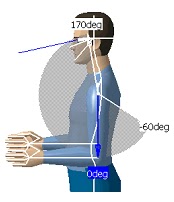 This procedure describes how to use the Edit Preferred Angles command. By dividing the total range of motion of the manikin into a certain number of ranges, it is possible to compute a global and a local score that quantifies the current posture. The Edit Pref
erred Angles command enables the user to define these ranges on individual DOFs. Selecting another segment while the command is running opens the Preferred angles dialog box for the new segment and closes it for the previous one.
1. Select the Edit Preferred Angles icon and then select a segment. The preferred angles for that segment are displayed.
2. With the right mouse button, click anywhere in the white range of motion region to display the contextual data.
Click on an option to activate it.

This procedure describes how to use the Edit Preferred Angles command. By dividing the total range of motion of the manikin into a certain number of ranges, it is possible to compute a global and a local score that quantifies the current posture. The Edit Preferred Angles command enables the user to define these ranges on individual DOFs. Selecting another segment while the command is running opens the Preferred angles dialog box for the new segment and closes it for the previous one.
1. Select the Edit Preferred Angles icon and then select a segment. The preferred angles for that segment are displayed.
2. With the right mouse button, click anywhere in the white range of motion region to display the contextual data.
Click on an option to activate it.


